
Babysits - Find Babysitters
BabysitsParenting
4.2153.00 Reviews
- Version
- 10.1.0
- Installs
- 1.00M
- Age Rating
- Everyone
Screenshots
Our Review of Babysits - Find Babysitters
 Analysis by Appyee
Finding childcare is not a one-off task for many families. It can mean arranging a regular afternoon, filling a gap when plans change, or building a list of people you might call when your usual help is unavailable. I find Babysits - Find Babysitters most useful when I treat it as a way to discover and contact potential sitters, rather than as a shortcut around the careful decisions that childcare requires.
Why the first week can feel promising
The first appeal is practical: a parent can look through sitter profiles, narrow the search, and start a conversation without relying only on a neighborhood message thread or a friend’s recommendation. Babysits is a parenting app from Babysits, and its purpose is easy to understand once you begin looking for someone who fits your family’s schedule and needs. The app is free to download, though in-app purchases range from $24.99 to $99.96 per item, so I would check the current purchase details before assuming every part of the experience will remain free.
It has a 4.0 average from around 11,000 ratings, and more than a million installs. Those figures suggest that it has reached plenty of families, but they do not tell me whether a sitter is suitable for a particular child or whether there are active profiles in my area. I would use the app to make a shortlist, then judge each person on the details of their profile and the conversation that follows.
For a busy household, the initial benefit is organization. Instead of keeping names, availability, and questions scattered across notes and messages, you can use a single place to browse and make contact. That can be especially handy when childcare is needed for a recurring slot, because you can think beyond the immediate emergency and compare possible matches at a less frantic pace.
Making a search useful, not just broad
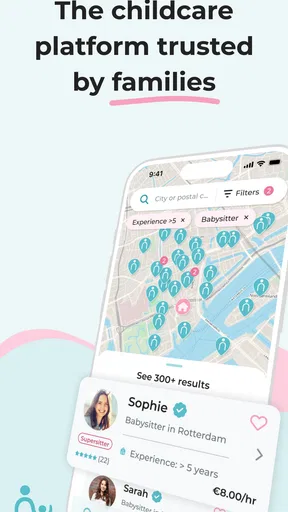
A large set of results is not automatically a good result. I would start by deciding what matters most for the specific job: the hours, the children’s ages, relevant experience, and any routine or care needs a sitter should understand. Then I would use location, availability, and experience filters to reduce the list, rather than scrolling through profiles without a clear idea of what I am looking for.
One useful habit is to separate must-haves from preferences before sending messages. If a family needs someone for a fixed weekday afternoon, availability may matter more than a profile that looks impressive but cannot cover that time. If the role involves a child with allergies or twins, those needs deserve a direct discussion rather than an assumption based on a short profile. The app can help you identify candidates; the parent still has to verify that the match works in real life.
I would also keep a small set of consistent questions for each candidate. Ask about the exact hours, the children’s usual routine, and how the sitter would handle the situations that matter most to your household. Using the same questions makes it easier to compare answers fairly. It also helps avoid a common trap of choosing the person who responds most warmly while overlooking whether the practical arrangements actually fit.
A realistic use case: filling a weekly gap
Imagine a parent whose workday ends later than school pickup on one afternoon each week. Rather than searching from scratch every Wednesday, they could browse profiles with the relevant location and availability in mind, contact a few promising sitters, and discuss whether the recurring time suits both sides. If one candidate seems promising, the family can then arrange a conversation and clarify expectations before relying on that person for regular care.
That workflow is more useful than treating the app as an instant booking button. A profile can help start the assessment, but it cannot show how a sitter interacts with your child or whether your household routines are a comfortable fit. I would leave enough time for a proper introduction, share essential instructions clearly, and avoid making a first meeting happen at the last possible minute. For urgent, same-day coverage, an established sitter or a trusted personal contact may be a better option.
For occasional care, the app can still be worth opening when a family has an event or an appointment coming up. The advantage is having a place to explore options and start conversations. The trade-off is that a new contact takes time to assess, so the more important or time-sensitive the occasion, the less sensible it is to depend on a newly discovered profile alone.
Getting Started with Babysits
First things first, downloading Babysits is a breeze. Available on both Android and iOS, it took me less than a minute to get it up and running. The app’s interface is pretty straightforward, which is a relief when you're already knee-deep in parenting chaos. Once you open it, you’re greeted with a clean layout that’s easy to navigate, even if you’re running on three hours of sleep and caffeine.
Creating Your Profile
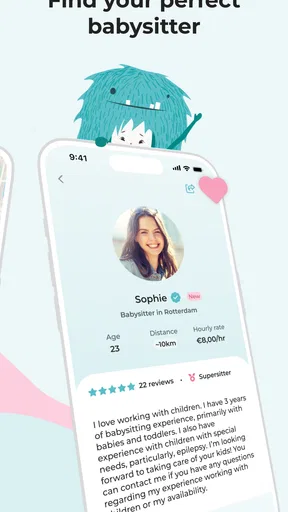
Setting up your profile is the next step, and it's as simple as pie. You fill in your details, and voilà, you’re good to go. What I appreciate here is that Babysits encourages you to add specifics about your family’s needs. Got a child with allergies? Check. Need someone who can handle twin toddlers? Double check. This level of detail helps in finding the perfect match for your family.
Finding the Right Babysitter
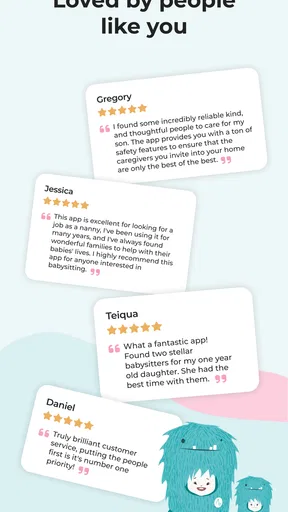
Here comes the fun part: searching for a babysitter. Babysits offers a robust search feature where you can filter potential sitters based on location, availability, and experience. As a parent, I found it super helpful to read through the profiles and reviews of the sitters. It’s like having a mini-interview without the awkward small talk. Plus, seeing reviews from other parents gives that extra bit of reassurance.
That reassurance is useful, but I would treat reviews as one input rather than a guarantee. A positive account from another family cannot tell you everything about how a sitter will fit your children, your expectations, or a particular schedule. I would read for concrete details, note anything I want to clarify, and use the first conversation to check that the profile and the person’s plans line up.
Contacting and Hiring
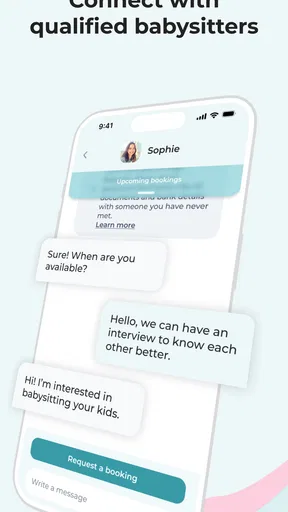
Once you’ve found a potential babysitter, the app allows you to contact them directly. There’s an in-app messaging feature that’s smooth and efficient. I reached out to a couple of sitters, and the response time was impressively quick. You can discuss details, set expectations, and even negotiate rates all through this feature. Talk about convenience!
Messaging is most valuable when it moves the conversation from general interest to clear arrangements. I would put the proposed date and hours, the children’s routine, and any important care instructions in writing so neither side has to rely on memory. Before confirming a regular arrangement, it is also sensible to agree on what happens if plans change. A tidy message thread can make coordination easier, but it does not replace a direct conversation about responsibilities.
Features That Stand Out
One thing that really caught my eye is the community aspect of Babysits. They have a section where parents and sitters can share tips and advice. It’s like a mini support group within the app, and trust me, we parents need all the support we can get!
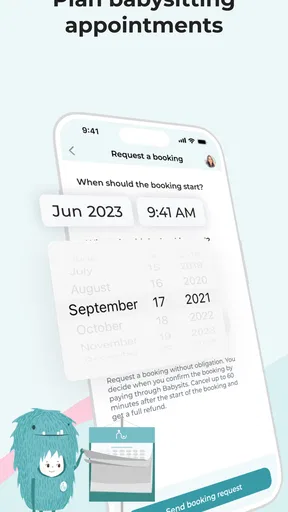
Another nifty feature is the calendar integration. You can easily sync your appointments and keep track of bookings, ensuring you never double-book. This is golden for someone like me who tends to forget things amidst the daily hustle.
For a family with changing plans, the calendar is best treated as a coordination aid, not as the whole childcare plan. I would still confirm important arrangements with the sitter and keep any essential details somewhere I can find them quickly. That small extra step matters when multiple adults share pickup duties or when a schedule changes after the original plan was made.
Safety and Trust
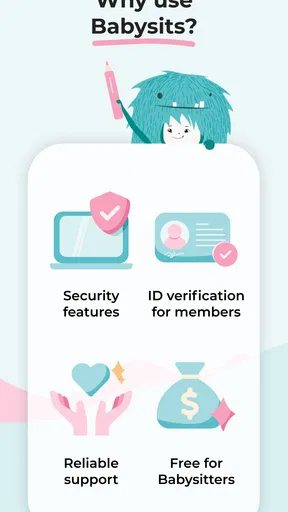
Let’s talk safety, because this is every parent's top concern. Babysits has a robust verification process in place. Sitters have to undergo identity checks, and there are options for background checks too. Plus, the reviews and ratings system adds another layer of trust. It's comforting to know that the app prioritizes safety as much as we do.
Moreover, the app provides guidelines and tips on conducting interviews and ensuring a safe environment for both your kids and the babysitter. This is a great touch, especially for first-time users.
I would still make my own checks part of the process. Read the profile carefully, ask follow-up questions, and arrange an introduction that gives you a chance to see how the sitter and your child communicate. Verification can contribute to confidence, but it should not decide the match for you. If something in a conversation feels unclear, I would pause and get clarity rather than letting the convenience of the app rush the decision.
What changes after the novelty wears off
The lasting value depends on whether your family searches for childcare often enough to make a maintained shortlist worthwhile. For a household with a regular need, keeping useful profiles and conversations organized can save effort the next time a shift, appointment, or school commitment creates a gap. For a family that rarely needs a sitter and already has dependable help, the app may sit unused for long stretches. That is not a flaw so much as a question of fit: its recurring value is strongest when childcare planning is a recurring task.
There is also some upkeep. Family details and availability should reflect the job you are actually offering, and old conversations or unsuitable profiles can make a later search harder to manage. I would refresh what I am asking for whenever the schedule changes, rather than sending the same vague request each time. Clear details may mean fewer mismatched conversations, even if it takes a little longer to prepare the profile or message.
Compared with asking friends and family, Babysits can widen the pool beyond people you already know, while personal referrals may offer context and trust that a profile cannot. Compared with a general local group, a dedicated childcare search can make it easier to focus on sitter experience and availability, but you still need to do the screening yourself. I see the app as a useful complement to recommendations, not a reason to abandon them.
The main source of fatigue is the human work around the search: comparing profiles, waiting for replies, asking questions, and deciding whom to meet. If there are few suitable candidates nearby or your schedule is unusually tight, browsing can feel like another task rather than a relief. Families who need guaranteed last-minute coverage, prefer to arrange everything through an established agency, or do not want to evaluate individual candidates may be better served by a different childcare route.
Who should keep it on their phone?
I would recommend trying it if you expect to look for sitters more than occasionally, want to compare candidates in one place, or need a way to start conversations beyond your immediate circle. It may also help first-time parents who want prompts for interviews and a clearer process for thinking through family requirements. The age rating is Everyone, and the current version is 9.1.6, with Android support beginning at version 7.0; those details make it accessible to many households, though the best experience still depends on finding suitable local candidates.
If your childcare is already stable, or you only need help in an emergency, you may get more from keeping trusted contacts close and using the app as a backup rather than making it your default. I would also skip relying on it as a substitute for an interview, a clear agreement, or your own judgement. The app helps with discovery and organization; the responsibility for choosing care remains with the family.
Final Thoughts
All in all, Babysits - Find Babysitters is a solid choice for parents looking to streamline the process of finding reliable childcare. It’s user-friendly, packed with useful features, and emphasizes safety, which is a huge win in my book. While no app is perfect, and it might take some time to find your ideal sitter, Babysits makes the journey a whole lot easier.
So, if you’re in the market for a babysitting app, give Babysits a whirl. It might just be the helping hand you’ve been looking for!
Verdict
Strengths of Babysits - Find Babysitters
- Easy to navigate interface.
- Real-time notifications for messages.
- Detailed profiles with reviews.
- Flexible booking options.
- Secure in-app payments.
Limitations of Babysits - Find Babysitters
- Limited free features.
- Occasional profile verification delays.
- Inconsistent availability in some areas.
- Some profiles lack detailed info.
- No built-in video chat feature.
Similar Picks in This Category
View All
Family Space
Motorola Mobility LLC.3.9

شرطة الأطفال - مكالمة وهمية
Oub Apps4.1

Findmykids: Parental Control
LETEM LTD4.6

Pregnancy + | Tracker App
Philips Electronics UK Limited4.8

Policía de niños - para padres
Kids police4.7

Pregnancy App
Amila4.9
Frequently Asked Questions
What is Babysits and how does it work?
Babysits is a platform designed to connect parents with babysitters, nannies, and child care providers. Users can create profiles, browse through caregiver listings, and communicate directly with potential sitters. The app includes filters to help find suitable matches based on location, experience, and availability, ensuring a seamless hiring process.
Is Babysits safe to use for finding childcare?
Safety is a top priority for Babysits. The platform includes several features like verified profiles, user reviews, and ratings to help parents make informed decisions. Babysits also encourages users to conduct interviews and request references before hiring to ensure the safety of their children.
How much does it cost to use Babysits?
Babysits offers a free basic membership that allows users to create profiles and browse listings. However, to access premium features like unlimited messaging and advanced search filters, a subscription is required. Pricing details are available on the app, offering various plans to suit different needs and budgets.
Can I trust the reviews and ratings on Babysits?
Reviews and ratings on Babysits are submitted by users who have previously interacted with sitters or parents. While Babysits strives to maintain authenticity, users are encouraged to consider multiple reviews and conduct personal assessments to ensure reliability and suitability for their specific needs.
How do I contact a babysitter through Babysits?
To contact a babysitter on Babysits, create a profile and use the app’s messaging feature. With a premium membership, you can send unlimited messages to potential sitters. Before finalizing any arrangements, it's recommended to meet the sitter in person to discuss expectations and ensure compatibility.
